Affiliate links: if you buy through links on this page we may earn a commission, at no extra cost to you.
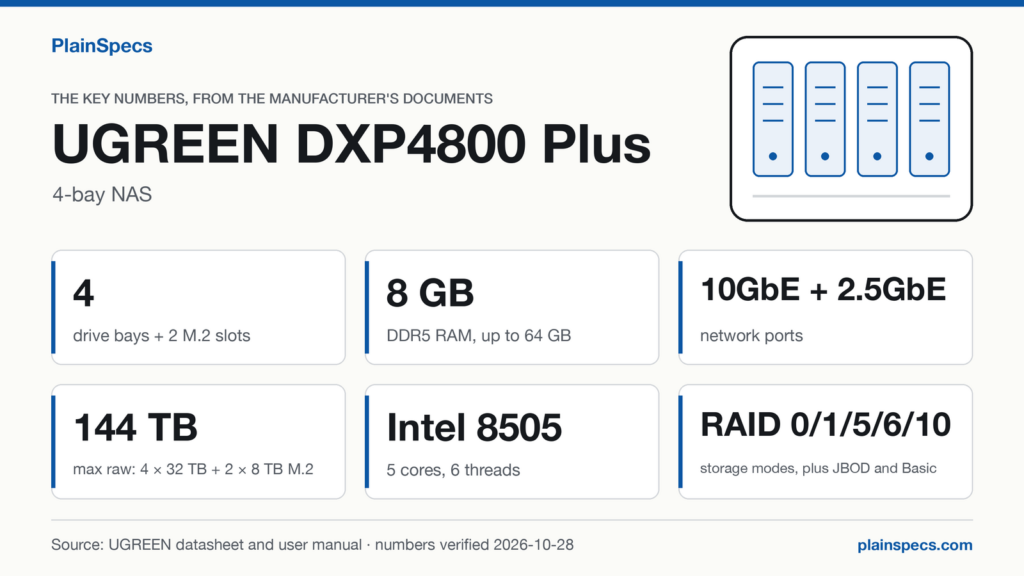
UGREEN DXP4800 Plus: the key numbers, verified
Verified against the manufacturer datasheet 2026-10-27 (opens in a new tab) (the spec table on UGREEN’s US product page) and the DXP4800 Plus user manual (opens in a new tab), version ModDate 2024-07-24, on .
| Spec | Value | Source |
|---|---|---|
| Processor | Intel 8505, 5 cores, 6 threads | Manual, p. 21; datasheet, “CPU Brand & Architecture” row |
| Memory, installed / maximum | 8 GB / 64 GB DDR5 | Datasheet, “Memory (RAM)” and “Expandable RAM (max)” rows |
| Memory slots | 2 × SODIMM, 1 module pre-installed | Manual, p. 4 and p. 21 |
| Drive bays | 4 × SATA, 2.5-inch or 3.5-inch | Manual, p. 21 |
| M.2 slots | 2 × M.2 NVMe 2280 SSD | Manual, p. 21 |
| Maximum storage (raw) | 144 TB (4 × 32 TB + 2 × 8 TB) | Datasheet, “Maximum Storage” row |
| Storage modes | JBOD, Basic, RAID 0, RAID 1, RAID 5, RAID 6, RAID 10 | Manual, p. 21 |
| Ethernet | 1 × 10GbE + 1 × 2.5GbE | Manual, p. 21 |
| USB | 1 × USB 3.2 Gen 2, 1 × USB-C USB 3.2 Gen 2, 1 × USB 3.2 Gen 1, 2 × USB 2.0 | Manual, p. 21 |
| Video output | 1 × HDMI, up to 4K | Manual, p. 21 |
| System storage | 128 GB SSD | Manual, p. 21 |
| Power consumption | 42.36 W (drive access), 18.12 W (drive hibernation) | Datasheet, “Power Consumption” row |
| Power adapter | DC 19V/7.9A | Manual, pp. 2, 12 and 21 |
If these numbers fit your setup, this is where to find the UGREEN DXP4800 Plus.
What the numbers mean
Processor: the Intel 8505 runs 6 threads on 5 cores
The manual names the processor as the Intel 8505, and UGREEN’s spec table adds 5 cores and 6 threads. Six threads let the processor run six streams of work at the same moment, which matters once the NAS does more than hand out files, for example serving two computers while a scheduled backup runs.
Memory: 8 GB out of the box, 64 GB means a 32 GB module in each slot
The datasheet states 8 GB of DDR5 installed and a maximum of 64 GB. The manual shows 2 SODIMM slots with 1 module pre-installed. Two slots and a 64 GB ceiling mean the maximum takes 64 ÷ 2 = 32 GB in each slot, so the factory memory comes out. Keeping it and adding one 32 GB module gives 8 + 32 = 40 GB, but UGREEN’s memory note (in the compatibility table below) recommends the same brand and model in both slots. For 64 GB, plan on two identical 32 GB DDR5 SODIMMs from UGREEN’s list.
Bays and M.2 slots: 144 TB raw is not 144 TB usable
The 4 SATA bays take 2.5-inch or 3.5-inch drives, and the 2 M.2 slots take an M.2 NVMe 2280 SSD each; the manual says those SSDs can work as a separate storage pool or a cache. UGREEN’s maximum of 144 TB adds up every slot filled with the largest drive UGREEN supports in it: 4 × 32 TB = 128 TB in the bays, plus 2 × 8 TB = 16 TB of SSD. That is raw space, before RAID takes its share for protection. With four 32 TB drives in the bays, the storage modes the NAS offers work out like this:
| Storage mode | Usable space in the four bays, 32 TB drives | How it is calculated |
|---|---|---|
| RAID 0 | 128 TB | 4 × 32 TB; no parity, so one failed drive loses the array |
| RAID 5 | 96 TB | (4 − 1) × 32 TB; one drive’s worth of parity |
| RAID 6 | 64 TB | (4 − 2) × 32 TB; two drives’ worth of parity |
| RAID 10 | 64 TB | 4 ÷ 2 × 32 TB; every drive has a mirror |
These are decimal terabytes, the unit drive makers print, counted before the file system and the NAS software take their own share of the space. An operating system that counts in binary units shows 96 TB as about 87.3 TiB (96 × 1012 ÷ 240), so the number on screen will look smaller than the table. The M.2 SSDs are not part of these sums: they form their own pool or act as a cache.
Network: what 10GbE and 2.5GbE mean for a copy
The manual lists 1 × 10GbE and 1 × 2.5GbE. Dividing by 8 bits per byte gives the line rate: 10 Gb/s is 1.25 GB/s and 2.5 Gb/s is 312.5 MB/s, before protocol overhead. At line rate, a 100 GB video project copies in 100 ÷ 1.25 = 80 seconds over 10GbE and in 100 ÷ 0.3125 = 320 seconds, more than five minutes, over 2.5GbE. Real copies run slower than line rate, but the ratio holds: the 10GbE port has 10 ÷ 2.5 = 4 times the ceiling of the other port, and you only get it if your computer or switch also has a 10GbE port.
Power: 42.36 W with drives in access, 18.12 W in hibernation
The datasheet rates 42.36 W with drives in access and 18.12 W with drives in hibernation. A full day at each rating is 42.36 W × 24 h = 1.02 kWh and 18.12 W × 24 h = 0.43 kWh. Over a year (365 × 24 = 8,760 hours) that is about 371 kWh at the drive-access rating around the clock and about 159 kWh at the hibernation rating around the clock. These are the two ratings UGREEN publishes, not a forecast: the spec table does not say which drives, or how many, were installed when they were measured, and it gives no figure for drives that are spinning but idle, so the draw with your own drives can be different. The adapter is rated DC 19V/7.9A, which works out to 19 V × 7.9 A = 150.1 W, about 3.5 times the 42.36 W access figure.
Ports: 5 USB ports and 1 HDMI output
The manual counts 1 × USB 3.2 Gen 2, 1 × USB-C USB 3.2 Gen 2, 1 × USB 3.2 Gen 1 and 2 × USB 2.0: 1 + 1 + 1 + 2 = 5 ports. For an external backup drive, use one of the two USB 3.2 Gen 2 ports, the fastest standard on the box; the USB 2.0 ports are the slowest. Video goes out through 1 HDMI port, up to 4K.
System storage: a separate 128 GB SSD
The manual lists a 128 GB SSD as system storage, apart from the 4 bays and the 2 M.2 slots, so you do not give up a bay or an M.2 slot to the system.
What it can and can’t do
It can
- Run RAID 5, RAID 6 or RAID 10 across its 4 SATA bays: 96 TB or 64 TB usable with 32 TB drives, from the table above
- Use M.2 NVMe SSDs as a cache or as a separate storage pool
- Join a 10GbE network through its RJ45 port
- Output video over HDMI at up to 4K
It can’t
- Take more than 64 GB of RAM, UGREEN’s stated maximum
Who it suits
- Buyers with a 10GbE workstation or switch who want four drive bays
- Storage that benefits from an M.2 SSD cache or a fast SSD pool next to the hard drives
Who should look elsewhere
- Buyers who need more than four SATA bays
- Buyers who need two 10GbE ports
Compatibility
UGREEN keeps separate US, UK and EU compatibility lists for the DXP4800 Plus. The rows below are the ones that shape a purchase: the 32 GB memory modules for the 64 GB maximum, the UPS list, and UGREEN’s general notes on memory, hard drives and M.2 SSDs. “Manufacturer” means the row is on UGREEN’s own list or notes.
| Item | Type | On UGREEN’s lists | Verification level | Source |
|---|---|---|---|---|
| Kingston KVR56S46BD8-32, 32 GB, 5600MHz | Memory | US, UK, EU | manufacturer | UGREEN compatibility list (opens in a new tab) |
| Samsung M425R4GA3BB0-CQK0D, 32 GB, 4800MHz | Memory | US, UK, EU | manufacturer | UGREEN compatibility list (opens in a new tab) |
| Samsung M425R4GA3EB0-CWMOL, 32 GB, 5600MHz | Memory | US, UK, EU | manufacturer | UGREEN compatibility list (opens in a new tab) |
| Team TED532G5600C46A-SBK, 32 GB, 5600MHz | Memory | US, UK, EU | manufacturer | UGREEN compatibility list (opens in a new tab) |
| ADATA AD5S560032G-B, 32 GB, 5600MHz | Memory | US, UK, EU | manufacturer | UGREEN compatibility list (opens in a new tab) |
| KLEVV KD5BGSA80-56G460A, 32 GB, 5600MHz | Memory | US, UK, EU | manufacturer | UGREEN compatibility list (opens in a new tab) |
| “For DDR4 supported models, choose laptop memory modules of 2666MHz or higher. For DDR5 supported models, choose laptop memory modules of 4800MHz or higher.“ | Memory, general note (all UGREEN models) | — | manufacturer | UGREEN compatibility page (opens in a new tab) |
| “When using two memory modules, it is recommended to match the same brand and model, such as 16+16GB or 32+32GB. Maximum support is up to 64GB.“ | Memory, general note (all UGREEN models) | — | manufacturer | UGREEN compatibility page (opens in a new tab) |
| UGREEN US3000 | UPS | US, UK, EU | manufacturer | UGREEN compatibility list (opens in a new tab) |
| APC BR1500MS2 | UPS | US, EU | manufacturer | UGREEN compatibility list (opens in a new tab) |
| CyberPower CP850AVRLCDa | UPS | US, EU | manufacturer | UGREEN compatibility list (opens in a new tab) |
| Tripp Lite SMART1500LCD | UPS | US, EU | manufacturer | UGREEN compatibility list (opens in a new tab) |
| “Supports minimum actual capacity of 100GB (marked capacity above 120GB); maximum capacity up to 32TB“ | Hard drives, general note (all UGREEN models) | — | manufacturer | UGREEN compatibility page (opens in a new tab) |
| “Avoid using SMR drives, especially do not use SMR drives in RAID1 or RAID5 mode. Confirm SMR status with dealers or search by models online. For RAID5, use enterprise or NAS drives to reduce data risk“ | Hard drives, general note (all UGREEN models) | — | manufacturer | UGREEN compatibility page (opens in a new tab) |
| “Recommended to use major brand NAS drives, such as Seagate IronWolf series and Western Digital Red Plus/Pro series“ | Hard drives, general note (all UGREEN models) | — | manufacturer | UGREEN compatibility page (opens in a new tab) |
| “SAS interface drives are currently not supported“ | Hard drives, general note (all UGREEN models) | — | manufacturer | UGREEN compatibility page (opens in a new tab) |
| “The M.2 interface supports high-speed storage and read-only cache features“ | M.2 SSDs, general note (all UGREEN models) | — | manufacturer | UGREEN compatibility page (opens in a new tab) |
| “Given the compatibility and power consumption issues of PCIe 4.0, it is not recommended to install SSDs with high power PCIe 4.0.“ | M.2 SSDs, general note (all UGREEN models) | — | manufacturer | UGREEN compatibility page (opens in a new tab) |
| “When setting up high-speed storage, the SSD must be at least 32GB, with a maximum of 8TB supported.“ | M.2 SSDs, general note (all UGREEN models) | — | manufacturer | UGREEN compatibility page (opens in a new tab) |
| “SSDs with heatsinks are not supported; remove thick labels before installation if necessary.“ | M.2 SSDs, general note (all UGREEN models) | — | manufacturer | UGREEN compatibility page (opens in a new tab) |
Two of these notes change how you shop. The SMR warning means checking the recording technology of any hard drive before it goes into RAID 1 or RAID 5. And the heatsink rule means an M.2 SSD sold with a heatsink is not supported, even when its capacity sits inside UGREEN’s limits for high-speed storage.
Buying in the UK
UGREEN’s US and UK compatibility lists for the DXP4800 Plus do not match. These rows are on the US list and not on the UK list (compare UGREEN’s US list (opens in a new tab) and UK list (opens in a new tab)):
- UPS BR1500MS2 (APC): on UGREEN’s US and EU lists, not on its UK list (lists checked: US, UK and EU).
- UPS CP850AVRLCDa (CyberPower): on UGREEN’s US and EU lists, not on its UK list (lists checked: US, UK and EU).
- UPS SMART1500LCD (Tripp Lite): on UGREEN’s US and EU lists, not on its UK list (lists checked: US, UK and EU).
- Memory M425R1GB4BB0-CWM (Samsung): on UGREEN’s US and EU lists, not on its UK list (lists checked: US, UK and EU).
- Memory M425R1GB4PB0-CWM (Samsung): on UGREEN’s US list only, not on its UK list (lists checked: US, UK and EU).
- Memory M425R2GA3BB0-CWM (Samsung): on UGREEN’s US list only, not on its UK list (lists checked: US, UK and EU).
- M.2 SSD CN600 Pro 1TB (Colorful): on UGREEN’s US list only, not on its UK list (lists checked: US, UK and EU).
- M.2 SSD CN600 Pro 2TB (Colorful): on UGREEN’s US list only, not on its UK list (lists checked: US, UK and EU).
- M.2 SSD 970 EVO Plus 500GB (Samsung): on UGREEN’s US list only, not on its UK list (lists checked: US, UK and EU).
- M.2 SSD P44 PRO: on UGREEN’s US list only, not on its UK list (lists checked: US, UK and EU).
On the UK list, the only UPS for this model is UGREEN’s own US3000.
What to buy with it
UGREEN DXP4800 Plus: Where to buy the UGREEN DXP4800 Plus (opens in a new tab)
- Memory × 2: two identical 32 GB DDR5 SODIMM modules from UGREEN’s memory list (compatibility table above) take it from 8 GB to the 64 GB maximum, with the same brand and model in both slots as UGREEN recommends.
- Hard drives × 4: one per SATA bay, from UGREEN’s hard drive list for this model, not SMR, and SATA rather than SAS (UGREEN’s notes above).
- A UPS: the UGREEN US3000, on UGREEN’s UPS list for this model in the US, UK and EU.
Changelog
- : First published.
- : Added a key-numbers card as the featured image.
Edited by Stefano Mastria. Verified against manufacturer datasheet 2026-10-27 on .