Affiliate links: if you buy through links on this page we may earn a commission, at no extra cost to you.
DS225+ compatible drives: Synology’s list in one table
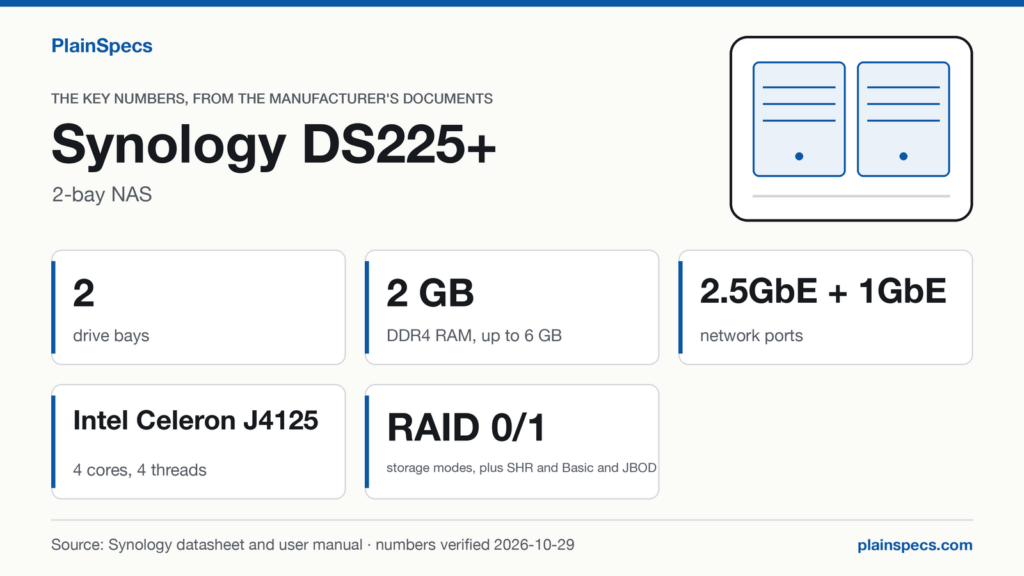
Synology’s compatibility list for the DS225+ has 41 rows, and every drive on it is a Synology drive: 22 hard drives and 19 SSDs, each listed with a firmware version and the DSM version to install first. For its 4 SATA bays the DS925+ list is the same: we compared the two lists row by row and found the same 41 rows, with the same firmware and the same minimum DSM versions. The DS225+ has 2 bays, and its Product Spec names two drive types for them: 3.5″ SATA HDD and 2.5″ SATA SSD.
The column “Install DSM first” is Synology’s note on each drive: upgrade DiskStation Manager (DSM) to that version or later before installing the drive. Synology writes that note for the drive, so read it as a check on your DSM version, not as the version your NAS runs. A drive that isn’t on the list is a separate case, covered by Synology’s DSM 7.3 policy further down.
| Drive | Type | Class | Capacity | Firmware | Install DSM first | DS225+ list | DS925+ list | Verification level |
|---|---|---|---|---|---|---|---|---|
| HAT3300-2T | 3.5″ SATA HDD | Plus | 2 TB | PL01 | DSM 7.2.1-69057-5 | Listed | Listed | Manufacturer |
| HAT5300-4T | 3.5″ SATA HDD | Enterprise | 4 TB | 1403 | DSM 6.2.4-25556 | Listed | Listed | Manufacturer |
| HAT5320-4T | 3.5″ SATA HDD | Enterprise | 4 TB | 1401 | DSM 7.2.2-72806 | Listed | Listed | Manufacturer |
| HAT3300-4T | 3.5″ SATA HDD | Plus | 4 TB | PL01 | DSM 7.1.1-42962-4 | Listed | Listed | Manufacturer |
| HAT3300-6T | 3.5″ SATA HDD | Plus | 6 TB | PL01 | DSM 7.1.1-42962-4 | Listed | Listed | Manufacturer |
| HAT5300-8T | 3.5″ SATA HDD | Enterprise | 8 TB | 1401 | DSM 6.2.4-25556 | Listed | Listed | Manufacturer |
| HAT5310-8T | 3.5″ SATA HDD | Enterprise | 8 TB | 1402 | DSM 7.1-42661 | Listed | Listed | Manufacturer |
| HAT5320-8T | 3.5″ SATA HDD | Enterprise | 8 TB | 1401 | DSM 7.2.2-72806 | Listed | Listed | Manufacturer |
| HAT3300-8T | 3.5″ SATA HDD | Plus | 8 TB | PL01 | DSM 7.1.1-42962-4 | Listed | Listed | Manufacturer |
| HAT3310-8T | 3.5″ SATA HDD | Plus | 8 TB | 1403 | DSM 7.2-64570 | Listed | Listed | Manufacturer |
| HAT3320-8T | 3.5″ SATA HDD | Plus | 8 TB | 1401 | DSM 7.2.2-72806 | Listed | Listed | Manufacturer |
| HAT5300-12T | 3.5″ SATA HDD | Enterprise | 12 TB | 1402 | DSM 6.2.4-25556 | Listed | Listed | Manufacturer |
| HAT3300-12T | 3.5″ SATA HDD | Plus | 12 TB | PL01 | DSM 7.1.1-42962-4 | Listed | Listed | Manufacturer |
| HAT3310-12T | 3.5″ SATA HDD | Plus | 12 TB | 1402 | DSM 7.2-64570 | Listed | Listed | Manufacturer |
| HAT5300-16T | 3.5″ SATA HDD | Enterprise | 16 TB | 1403 | DSM 6.2.4-25556 | Listed | Listed | Manufacturer |
| HAT5310-16T | 3.5″ SATA HDD | Enterprise | 16 TB | 1403 | DSM 7.2.2-72806 | Listed | Listed | Manufacturer |
| HAT3310-16T | 3.5″ SATA HDD | Plus | 16 TB | 1402 | DSM 7.2-64570 | Listed | Listed | Manufacturer |
| HAT5310-18T | 3.5″ SATA HDD | Enterprise | 18 TB | 1401 | DSM 7.1-42661 | Listed | Listed | Manufacturer |
| HAT5310-20T | 3.5″ SATA HDD | Enterprise | 20 TB | 1401 | DSM 7.2.1-69057 | Listed | Listed | Manufacturer |
| HAT5320-20T | 3.5″ SATA HDD | Enterprise | 20 TB | 1402 | DSM 7.3.2-86009 | Listed | Listed | Manufacturer |
| HAT3320-20T | 3.5″ SATA HDD | Plus | 20 TB | 1401 | DSM 7.2.2-72806 | Listed | Listed | Manufacturer |
| HAT5320-24T | 3.5″ SATA HDD | Enterprise | 24 TB | 1401 | DSM 7.2.2-72806 | Listed | Listed | Manufacturer |
| SAT5200-480G | 2.5″ SATA SSD | Enterprise | 480 GB | SCEMJ2.1 | DSM 6.2.3-25426 | Listed | Listed | Manufacturer |
| SAT5210-480G | 2.5″ SATA SSD | Enterprise | 480 GB | SCEMH3.2 | DSM 7.0.1-42218 | Listed | Listed | Manufacturer |
| SAT5220-480G | 2.5″ SATA SSD | Enterprise | 480 GB | SCEMH5.0 | DSM 7.2-64570 | Listed | Listed | Manufacturer |
| SAT5221-480G | 2.5″ SATA SSD | Enterprise | 480 GB | F3MN902 | DSM 7.2.1-69057 | Listed | Listed | Manufacturer |
| SAT5200-960G | 2.5″ SATA SSD | Enterprise | 960 GB | SCEMJ2.1 | DSM 6.2.3-25426 | Listed | Listed | Manufacturer |
| SAT5210-960G | 2.5″ SATA SSD | Enterprise | 960 GB | SCEMH3.2 | DSM 7.0.1-42218 | Listed | Listed | Manufacturer |
| SAT5220-960G | 2.5″ SATA SSD | Enterprise | 960 GB | SCEMH5.0 | DSM 7.2-64570 | Listed | Listed | Manufacturer |
| SAT5221-960G | 2.5″ SATA SSD | Enterprise | 960 GB | F3MN902 | DSM 7.2.1-69057 | Listed | Listed | Manufacturer |
| SAT5200-1920G | 2.5″ SATA SSD | Enterprise | 1.92 TB | SCEMJ2.1 | DSM 6.2.3-25426 | Listed | Listed | Manufacturer |
| SAT5210-1920G | 2.5″ SATA SSD | Enterprise | 1.92 TB | SCEMH3.2 | DSM 7.0.1-42218 | Listed | Listed | Manufacturer |
| SAT5220-1920G | 2.5″ SATA SSD | Enterprise | 1.92 TB | SCEMH5.0 | DSM 7.2-64570 | Listed | Listed | Manufacturer |
| SAT5221-1920G | 2.5″ SATA SSD | Enterprise | 1.92 TB | SCEM16.3 | DSM 7.2.1-69057 | Listed | Listed | Manufacturer |
| SAT5221-1920G | 2.5″ SATA SSD | Enterprise | 1.92 TB | F3MN902 | DSM 7.2.1-69057 | Listed | Listed | Manufacturer |
| SAT5200-3840G | 2.5″ SATA SSD | Enterprise | 3.84 TB | SCEMJ2.1 | DSM 6.2.3-25426 | Listed | Listed | Manufacturer |
| SAT5210-3840G | 2.5″ SATA SSD | Enterprise | 3.84 TB | SCEMH3.2 | DSM 7.0.1-42218 | Listed | Listed | Manufacturer |
| SAT5220-3840G | 2.5″ SATA SSD | Enterprise | 3.84 TB | SCEMH5.0 | DSM 7.2-64570 | Listed | Listed | Manufacturer |
| SAT5221-3840G | 2.5″ SATA SSD | Enterprise | 3.84 TB | SCEM16.3 | DSM 7.2.1-69057 | Listed | Listed | Manufacturer |
| SAT5221-3840G | 2.5″ SATA SSD | Enterprise | 3.84 TB | F3MN902 | DSM 7.2.1-69057 | Listed | Listed | Manufacturer |
| SAT5210-7000G | 2.5″ SATA SSD | Enterprise | 7 TB | SCEMH5.0 | DSM 7.1.1-42962 | Listed | Listed | Manufacturer |
Checked against Synology’s Products Compatibility List, HDD/SSD via internal slot, for the DS225+ (opens in a new tab) and the DS925+ (opens in a new tab), Synology’s article on drive compatibility policies (opens in a new tab), and the DS225+ Product Spec (opens in a new tab) (Last updated: Aug 6, 2026) and DS925+ Product Spec (opens in a new tab) (Last updated: Aug 6, 2026); records verified on .
If the drives you plan to use are on Synology’s list above, this is where to find the Synology DS225+.
DS925+ compatible drives: the same SATA list, plus M.2
Everything in the table above applies to the DS925+ bays as well. What the DS925+ adds is 2 M.2 slots for M.2 2280 NVMe SSD, with a list of their own: ten rows, all Synology SNV-series SSDs. Synology lists storage pool creation as a use for those slots. The DS225+ Product Spec names no M.2 drive type, so these rows are for the DS925+ only.
| Drive | Type | Capacity | Firmware | Install DSM first | DS925+ list | Verification level |
|---|---|---|---|---|---|---|
| SNV3400-400G | M.2 NVMe SSD | 400 GB | ECEM12.4 | DSM 6.2.3-25426 | Listed | Manufacturer |
| SNV3400-800G | M.2 NVMe SSD | 800 GB | ECEM12.4 | DSM 6.2.3-25426 | Listed | Manufacturer |
| SNV3410-400G | M.2 NVMe SSD | 400 GB | ECEM13.2 | DSM 7.1-42661 | Listed | Manufacturer |
| SNV3410-800G | M.2 NVMe SSD | 800 GB | ECEM13.2 | DSM 7.1-42661 | Listed | Manufacturer |
| SNV5420-400G | M.2 NVMe SSD | 400 GB | FG2N903 | DSM 7.2.2-72806 | Listed | Manufacturer |
| SNV5420-800G | M.2 NVMe SSD | 800 GB | FG2N903 | DSM 7.2.2-72806 | Listed | Manufacturer |
| SNV5420-1600G | M.2 NVMe SSD | 1.6 TB | FG2N903 | DSM 7.2.2-72806 | Listed | Manufacturer |
| SNV5420-400G | M.2 NVMe SSD | 400 GB | FG2N904 | DSM 7.4.1-90080 | Listed | Manufacturer |
| SNV5420-800G | M.2 NVMe SSD | 800 GB | FG2N904 | DSM 7.4.1-90080 | Listed | Manufacturer |
| SNV5420-1600G | M.2 NVMe SSD | 1.6 TB | FG2N904 | DSM 7.4.1-90080 | Listed | Manufacturer |
Synology’s note on the M.2 list reads: “Directly install M.2 SSDs through the built-in M.2 slots on your Synology NAS.” Source: DS925+ M.2 SSD list (opens in a new tab).
Synology drive compatibility from 2025: what DSM 7.3 allows
The storage note in each Product Spec points to a Synology Knowledge Center article, Drive compatibility policies FAQs for Synology storage systems starting from 2025 (DSM 7.3 and above) (opens in a new tab). The DS225+ and the DS925+ fall under its table for DS Plus and desktop models of FS series (DSM 7.3). That table sorts a drive into three cases (on the list, not on the list, incompatible) and says what each case allows from DSM 7.3:
| Drive type | Status on Synology’s list | New installation and storage pool | Cache | Migration from another Synology system | Verification level |
|---|---|---|---|---|---|
| HDD | Listed | Yes | Not stated | Yes | Manufacturer |
| HDD | Not listed | Yes | Not stated | Yes | Manufacturer |
| HDD | Incompatible | No | No | No | Manufacturer |
| 2.5″ SATA SSD | Listed | Yes | Yes | Yes | Manufacturer |
| 2.5″ SATA SSD | Not listed | Yes | Yes | Yes | Manufacturer |
| 2.5″ SATA SSD | Incompatible | No | No | No | Manufacturer |
| M.2 NVMe SSD (DS925+ only) | Listed | Yes | Yes | Yes | Manufacturer |
| M.2 NVMe SSD (DS925+ only) | Not listed | No | No | Yes | Manufacturer |
| M.2 NVMe SSD (DS925+ only) | Incompatible | No | No | No | Manufacturer |
“Not stated” means the policy table doesn’t name cache for hard drives. For an M.2 SSD that isn’t on the list, Synology adds: “Drives must be migrated directly from an existing Synology system. If the original storage pool or SSD cache is removed from the drive, the drive will no longer be usable in your current Synology system.” Source: Drive compatibility policies (opens in a new tab), Synology Knowledge Center.
Two more lines from Synology matter for a drive that isn’t on the list. On the DS225+ list: “For drives not on the compatibility list, Synology can only provide limited support for system hardware, software, and configuration. Support will not extended to issues caused by the drive itself or its firmware.” In the DS225+ Product Spec: “Synology only guarantees full functionality, reliability, and performance for compatible drives. Please consult our compatibility list before purchasing hard drives.“
Which means that on DSM 7.3 a hard drive from another brand, which is on neither list, can still be used, unless Synology marks it incompatible, to install DSM and to create a storage pool on the DS225+ and the DS925+, and can come over from another Synology system, but Synology limits its support for problems caused by that drive. On the DS925+, an M.2 SSD that isn’t on the list can arrive only by migration from another Synology system.
What the list means in numbers
Capacity: the largest listed drive against the volume limit
The largest drive on the SATA list is the HAT5320-24T, at 24 TB. Two of them fill the DS225+ with 48 TB of raw capacity; four fill the DS925+ with 96 TB. Synology’s Product Specs state a maximum single volume of 108 TB for the DS225+ and the same 108 TB for the DS925+, which rises to 200 TB on the DS925+ with 32 GB of memory installed.
Which means that with listed drives the internal bays stay under the 108 TB limit on both models: 48 TB is 44% of it on the DS225+, 96 TB is 89% of it on the DS925+. The 200 TB limit, and the 32 GB of memory it needs, don’t come into play for the four internal bays of the DS925+.
One listed drive, both NAS: the HAT5300-16T
The HAT5300-16T is a 16 TB Enterprise hard drive, with firmware 1403, and it is listed for the DS925+ as well as the DS225+. Two of them give the DS225+ 32 TB of raw capacity. For the DS225+, Synology lists SHR, Basic, JBOD, RAID 0 and RAID 1; a RAID 1 mirror keeps the same data on both drives, so the space you can fill is one drive’s 16 TB. Four of them give the DS925+ 64 TB of raw capacity.
By DSM version: what each listed drive asks for
Counted from the SATA table above, by the DSM version Synology’s note asks you to install first:
| Install DSM first | Hard drives | SSDs | Rows |
|---|---|---|---|
| DSM 6.2.3-25426 | 0 | 4 | 4 |
| DSM 6.2.4-25556 | 4 | 0 | 4 |
| DSM 7.0.1-42218 | 0 | 4 | 4 |
| DSM 7.1-42661 | 2 | 0 | 2 |
| DSM 7.1.1-42962 | 0 | 1 | 1 |
| DSM 7.1.1-42962-4 | 4 | 0 | 4 |
| DSM 7.2-64570 | 3 | 4 | 7 |
| DSM 7.2.1-69057 | 1 | 6 | 7 |
| DSM 7.2.1-69057-5 | 1 | 0 | 1 |
| DSM 7.2.2-72806 | 6 | 0 | 6 |
| DSM 7.3.2-86009 | 1 | 0 | 1 |
The highest requirement on the SATA list belongs to one row, the HAT5320-20T with firmware 1402, which asks for DSM 7.3.2-86009. Every other row asks for DSM 7.2.2-72806 or an earlier version. Which means that on DSM 7.3.2-86009 or later every drive on the list meets its note; on an earlier DSM, check the column for the drive you plan to buy.
Same model, two firmware versions
Synology lists a drive by model and firmware, so the 41 SATA rows are 39 models. The SAT5221-1920G appears with firmware SCEM16.3 and F3MN902, and so does the SAT5221-3840G (SCEM16.3 and F3MN902); both firmware versions ask for the same DSM. On the DS925+ M.2 list the firmware makes a difference: the SNV5420-800G with firmware FG2N903 asks for DSM 7.2.2-72806, with firmware FG2N904 for DSM 7.4.1-90080, and the SNV5420-400G and SNV5420-1600G follow the same pattern. Which means that for those three SSDs the firmware on the drive decides which DSM version you need first.
Only Synology drives on both lists
All 41 SATA rows and all ten M.2 rows are Synology drives: 12 Enterprise-class hard drives (HAT53xx), 10 Plus-class hard drives (HAT33xx), 19 Enterprise-class SATA SSDs (SAT52xx) and 10 Enterprise-class M.2 SSDs (SNV34xx and SNV54xx). A hard drive from another brand is therefore on neither list: in the DSM 7.3 table above it falls under “Not listed”, or under “Incompatible” if Synology marks it so.
Where to buy the models on this page
- Synology DS225+, 2-bay NAS: Where to buy the Synology DS225+ (opens in a new tab)
- Synology DS925+, 4-bay NAS: Where to buy the Synology DS925+ (opens in a new tab)
- Synology HAT5300-16T, the 16 TB hard drive on both lists: Where to buy the Synology HAT5300-16T (opens in a new tab)
We link one drive from the list as an example. It is not a ranking: every row in the tables carries the same “Listed” status.
Changelog
- : first published.
Edited by Stefano Mastria. Verified against Synology’s DS225+ Product Spec (Last updated: Aug 6, 2026) and Product Manual (Last updated: May 5, 2025), DS925+ Product Spec (Last updated: Aug 6, 2026), Synology’s compatibility lists for both models and its drive compatibility policies article, on .