Affiliate links: if you buy through links on this page we may earn a commission, at no extra cost to you.
DS225+ RAM upgrade: the short answer
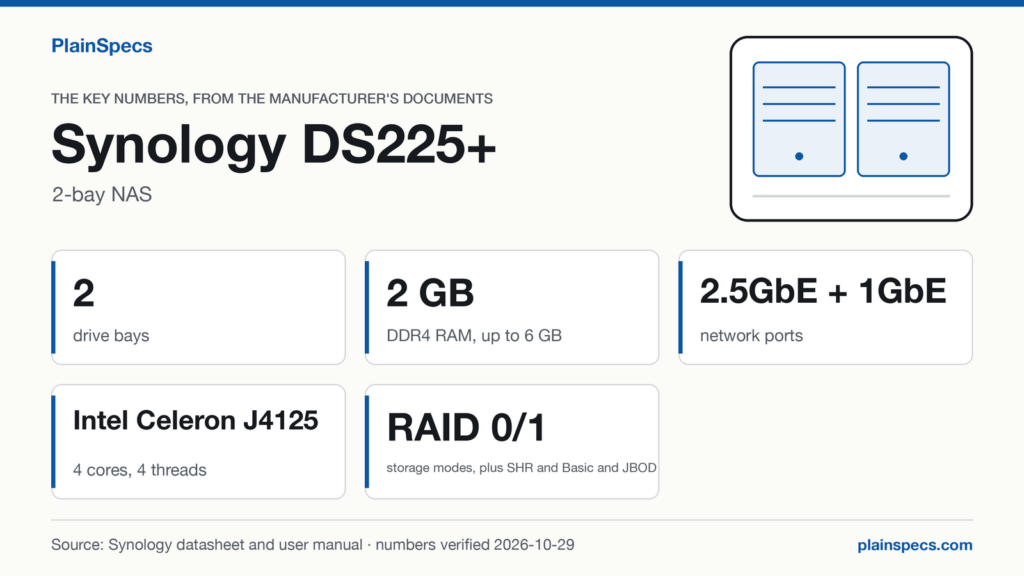
The Synology DS225+ ships with 2 GB of DDR4 non-ECC memory and has 1 memory slot. Synology’s maximum is 6 GB, and its DS225+ RAM list has one module: the D4NS01-4G, a 4 GB DDR4 non-ECC SODIMM.
Synology’s Product Manual describes the slot as empty and tells you to insert the new module into it. Which means the upgrade adds a module rather than replacing one: one D4NS01-4G in the slot takes the DS225+ from 2 GB to 2 + 4 = 6 GB, Synology’s maximum, and Synology’s documents describe no step after that.
| DS225+ memory | What Synology states | Source |
|---|---|---|
| Installed | 2 GB DDR4 non-ECC | Product Spec, p. 2 |
| Slots | 1, described as empty in the Product Manual | Product Spec, p. 2; Product Manual, p. 19 |
| Module form factor | SODIMM | Product Spec, p. 6 (Optional Accessories) |
| Maximum | 6 GB | Product Spec, p. 2 |
| Module on Synology’s list | D4NS01-4G, 4 GB (verification level: manufacturer) | DS225+ RAM compatibility list (opens in a new tab) |
Checked against Synology’s DS225+ Product Spec (opens in a new tab) (Last updated: Aug 6, 2026), the DS225+ Product Manual (opens in a new tab) (Last updated: May 5, 2025) and Synology’s DS225+ RAM compatibility list; record verified on .
If 1 slot and a 6 GB ceiling fit the way you plan to use it, this is where to find the Synology DS225+.
The module on Synology’s DS225+ RAM list
Synology’s RAM list for the DS225+ has one module, and the Product Spec names the same one under Optional Accessories. It is a Synology module, and the list has no third-party module.
| Module | Capacity | Type | On the RAM list (opens in a new tab) | In the Product Spec’s Optional Accessories (p. 6) | Verification level |
|---|---|---|---|---|---|
| D4NS01-4G | 4 GB | DDR4 non-ECC SODIMM | Listed | Listed, as D4NS01-4G (DDR4 non-ECC SODIMM) | Manufacturer |
Synology’s RAM list carries this note: “For optimal compatibility and reliability, use memory modules manufactured by Synology. Installing third-party memory may cause system issues. Complete product warranty and technical support services are only available for Synology memory modules.” The Product Spec (p. 2) says Synology will not provide complete product warranty or technical support if non-Synology memory modules are used for memory expansion, and the Product Manual (p. 21) says the same for a memory upgrade.
Every DS225+ memory configuration in Synology’s documents
The table sets the DS225+ as shipped and with the listed module against Synology’s 6 GB maximum and against the one memory threshold in the Product Spec: 4 GB for Synology Photos object recognition (p. 13).
| Configuration | In the memory slot | Total memory | Against Synology’s 6 GB maximum | Synology Photos object recognition (needs 4 GB) | Verification level |
|---|---|---|---|---|---|
| As shipped | Nothing: the Product Manual (p. 19) calls the slot empty | 2 GB | Below it | No | Manufacturer (Product Spec, p. 2) |
| One module added | D4NS01-4G | 2 + 4 = 6 GB | Equal to it | Yes | Manufacturer |
That is the whole upgrade path in Synology’s documents. With 1 slot there is no second slot for a matching pair, and with one module on the list there is no larger Synology module to fit instead.
What the numbers mean
One slot that starts empty: you add a module, you don’t swap one
The Product Spec (p. 2) gives 2 GB of installed memory and 1 memory slot. The Product Manual (p. 19) states that an empty memory slot is located on the inner-right side of the NAS, and (p. 20) tells you to insert the new memory module into the empty slot. Synology doesn’t say where the 2 GB sits, but it gives the maximum as 6 GB. Which means the room left under the maximum is 6 − 2 = 4 GB, the same as the capacity of the D4NS01-4G, 4 GB.
What about a “DS225+ RAM upgrade 16GB”?
Modules larger than the D4NS01-4G are outside everything Synology publishes for the DS225+. Its RAM list has one module, of 4 GB, and its maximum is 6 GB. Which means that, with the 2 GB the DS225+ ships with, any module larger than the D4NS01-4G puts the total past Synology’s maximum. No Synology source says how the DS225+ behaves with more memory than that, so this page doesn’t say whether a larger module works or doesn’t. What Synology does state is the note above: complete warranty and technical support only with Synology memory modules.
4 GB is the threshold for Synology Photos object recognition
The Product Spec (p. 13) notes that object recognition in Synology Photos requires an upgrade of memory capacity to a minimum of 4 GB. The DS225+ ships with 2 GB, half of that. Which means object recognition is the feature the Product Spec ties to this upgrade: with the D4NS01-4G added, the total of 6 GB meets the 4 GB minimum.
Non-ECC is the module type
The Product Spec gives the installed memory as DDR4 non-ECC, and the module on the DS225+ list is a DDR4 non-ECC SODIMM. Which means an ECC module, or a module of another memory generation, is not what Synology lists for this model, and any non-Synology module falls under the warranty and support note above.
Volume size doesn’t depend on memory here
The Product Spec (p. 7) gives a maximum single volume size of 108 TB for the DS225+, with no memory requirement attached to it. Which means the RAM upgrade is about features such as object recognition, not about how large a volume can be on this model.
Where the slot is, and how to check the upgrade
The Product Manual (p. 19-21) has you shut the DS225+ down, disconnect all cables and take the drive trays out of the drive bays; the empty slot is on the inner-right side. The module goes in with the gap between its gold connectors aligned to the notch on the slot, and you push it down until it clicks. After the drive trays and cables go back and the NAS starts, Synology’s check is in DSM: Control Panel > Info Center, Total Physical Memory. Source: the DS225+ Product Manual (opens in a new tab), Last updated: May 5, 2025.
Where to buy the module and the NAS on this page
- Synology D4NS01-4G, the 4 GB DDR4 non-ECC SODIMM on Synology’s DS225+ list; one fills the 1 slot and brings the DS225+ to the 6 GB maximum: Where to buy the Synology D4NS01-4G (opens in a new tab)
- Synology DS225+, 2-bay NAS: Where to buy the Synology DS225+ (opens in a new tab)
Changelog
- : First published.
Edited by Stefano Mastria. Verified against Synology’s DS225+ Product Spec (Last updated: Aug 6, 2026), DS225+ Product Manual (Last updated: May 5, 2025) and Synology’s DS225+ RAM compatibility list, on .