Affiliate links: if you buy through links on this page we may earn a commission, at no extra cost to you.
DS925+ RAM upgrade: the short answer
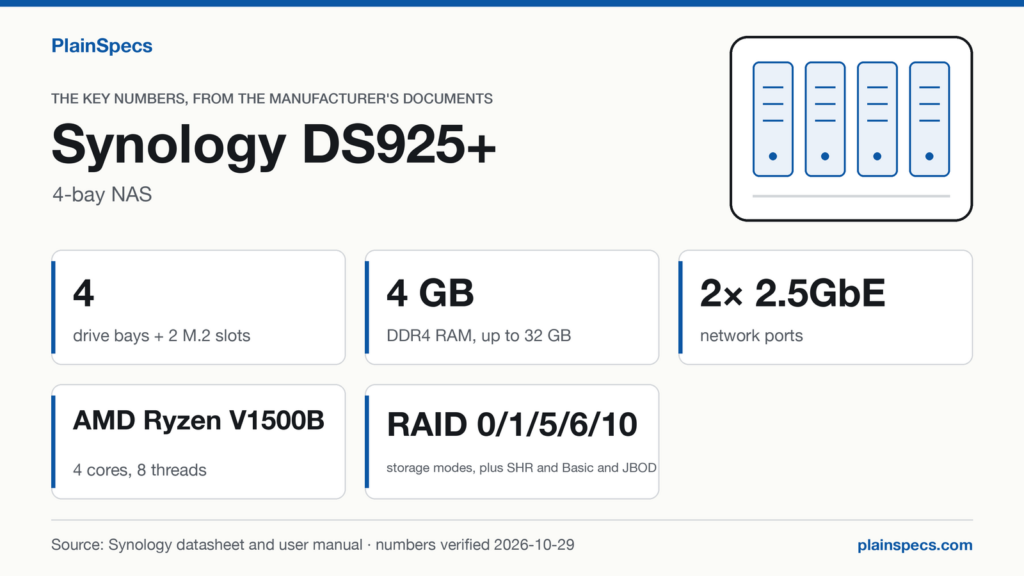
The Synology DS925+ ships with 4 GB of DDR4 ECC SODIMM memory, as one pre-installed module, and has 2 memory slots. Synology’s maximum is 32 GB, as 16 GB × 2.
Synology’s Product Spec also states that in a multi-module setup all modules must be identical and share the same model number. Which means the 4 GB module the DS925+ ships with can’t be paired with a larger one: reaching 32 GB takes two D4ES03-16G modules, and the pre-installed module comes out.
| DS925+ memory | What Synology states | Source |
|---|---|---|
| Installed | 4 GB, as 4 GB × 1 | Product Spec, p. 3 |
| Slots | 2 | Product Spec, p. 3 |
| Module type | DDR4 ECC SODIMM | Product Spec, p. 3 |
| Maximum | 32 GB (16 GB × 2) | Product Spec, p. 3 |
| Modules on Synology’s list | D4ES04-4G, D4ES03-8G, D4ES03-16G (verification level: manufacturer, for each module in the table below) | DS925+ RAM compatibility list (opens in a new tab) |
Checked against Synology’s DS925+ Product Spec (opens in a new tab) (Last updated: Aug 6, 2026), the DS925+ Product Manual (opens in a new tab) (Last updated: Mar 11, 2025) and Synology’s DS925+ RAM and drive compatibility lists; record verified on .
If these memory numbers fit the way you plan to use it, this is where to find the Synology DS925+.
The modules on Synology’s DS925+ RAM list
Synology’s RAM list for the DS925+ has three modules, and the Product Spec names the same three under Optional Accessories. All three are DDR4 ECC SODIMM, and the list has no third-party module.
| Module | Capacity | Type | On the RAM list (opens in a new tab) | In the Product Spec’s Optional Accessories (p. 7) | Verification level |
|---|---|---|---|---|---|
| D4ES04-4G | 4 GB | DDR4 ECC SODIMM | Listed | Listed, as D4ES04-4G | Manufacturer |
| D4ES03-8G | 8 GB | DDR4 ECC SODIMM | Listed | Listed, as D4ES03-8G | Manufacturer |
| D4ES03-16G | 16 GB | DDR4 ECC SODIMM | Listed | Listed, as D4ES03-16G | Manufacturer |
Two rules come with the list. The Product Spec (p. 3 and p. 7): “For multi-module memory configurations, all modules must be identical and share the same model number.” And Synology states it will not provide complete product warranty or technical support if non-Synology memory modules are used for memory expansion (Product Spec, p. 3; the Product Manual, p. 21, says the same).
Every configuration Synology lists, starting from the stock module
The Product Manual (p. 18) gives four memory configurations for the DS925+, as DIMM1 + DIMM2 = total (“-” is an empty slot). The table sets each one against the module list, the identical-module rule and the two memory thresholds of the Product Spec: 8 GB for AI Console de-identification (p. 13) and 32 GB for single volumes over 108 TB (p. 8-9).
| Synology’s configuration | What you fit | The pre-installed 4 GB module | AI Console de-identification (needs 8 GB) | Largest single volume | Verification level |
|---|---|---|---|---|---|
| 4 GB + – = 4 GB | Nothing: this is the DS925+ as shipped | Stays | No | 108 TB | Manufacturer |
| 4 GB + 4 GB = 8 GB | A second 4 GB module with the same model number as the pre-installed one | Stays | Yes, with Container Manager installed | 108 TB | Manufacturer |
| 8 GB + 8 GB = 16 GB | Two D4ES03-8G | Comes out | Yes, with Container Manager installed | 108 TB | Manufacturer |
| 16 GB + 16 GB = 32 GB | Two D4ES03-16G | Comes out | Yes, with Container Manager installed | 200 TB | Manufacturer |
Two things the table leaves out on purpose. Mixed pairs, such as the stock 4 GB module with a 8 GB module (12 GB) or with a 16 GB module (20 GB), aren’t in Synology’s table, and the identical-module rule rules them out: the model numbers differ. And the 4 GB + 4 GB = 8 GB row depends on the model number of the module already inside. Neither the Product Spec nor the Product Manual prints it, and the Product Spec (p. 3) notes that Synology may revise the pre-installed module’s specifications over time, so this page doesn’t assume that the D4ES04-4G on the list is the same model as the module in your DS925+.
What the numbers mean
Do you need 32 GB for large volumes? Not with four drives from Synology’s list
The Product Spec (p. 8-9) caps a single volume at 108 TB, or 200 TB with 32 GB of memory installed. The largest hard drive on Synology’s DS925+ drive list (opens in a new tab) is the HAT5320-24T, at 24 TB (verification level: manufacturer). Four of them in the 4 SATA bays add up to 4 × 24 = 96 TB of raw capacity, before any RAID protection takes its share. Which means that with four drives from Synology’s list in the internal bays, no single volume can reach the 108 TB above which Synology asks for 32 GB. Drives that aren’t on Synology’s list fall outside this check. Past four bays, with a DX525 expansion unit (up to 9 drive bays in total), it depends on the drives and on how the volumes are laid out, which this page doesn’t cover.
8 GB is the threshold for AI Console de-identification
The Product Spec (p. 13) states that de-identification in Synology AI Console needs at least 8 GB of memory and Container Manager installed. The DS925+ ships with 4 GB, half of that. Which means the smallest configuration in Synology’s table that meets it is 4 GB + 4 GB = 8 GB, with the model-number caveat above; 8 GB + 8 GB = 16 GB meets it with two modules from the list.
ECC is the module type, not an option
The Product Spec gives the installed memory as DDR4 ECC SODIMM, and every module on the DS925+ RAM list is DDR4 ECC SODIMM. Which means a non-ECC DDR4 SODIMM is not a module Synology lists for this model, and any non-Synology module falls under the warranty and support note above.
Where the slots are
The Product Manual (p. 18) places both memory slots on the inner-right side of the DS925+, reached after taking the drive trays out of the drive bays, with the pre-installed module already in one of them. Source: the DS925+ Product Manual (opens in a new tab), Last updated: Mar 11, 2025.
Where to buy the module and the NAS on this page
- Synology D4ES03-16G, the 16 GB DDR4 ECC SODIMM on Synology’s DS925+ list; two of them make the 32 GB maximum: Where to buy the Synology D4ES03-16G (opens in a new tab)
- Synology DS925+, 4-bay NAS: Where to buy the Synology DS925+ (opens in a new tab)
The D4ES04-4G and the D4ES03-8G have no link here: on this page we link only the module that reaches Synology’s maximum.
Changelog
- : first published.
Edited by Stefano Mastria. Verified against Synology’s DS925+ Product Spec (Last updated: Aug 6, 2026), DS925+ Product Manual (Last updated: Mar 11, 2025) and Synology’s DS925+ RAM and drive compatibility lists, on .